Phishing-Resistant MFA: What It Is, and Why It’s the Next Step Beyond Traditional MFA
WALLIX Sovereign Identity Access lets you sign in with a passkey, on its own or alongside your password, in a way that cannot be phished, with governance controls that let you decide who gets it and how.
If your organisation has multi-factor authentication (MFA) turned on, you’ve already done more than most. But MFA stopped being a single, uniform level of protection years ago. A one-time code texted to your phone and a passkey confirmed with your fingerprint are both called MFA, and today attackers can defeat one of them in real time, with off-the-shelf tools. They cannot defeat the other the same way.
That difference matters enough that government cybersecurity agencies increasingly treat phishing-resistant authentication as its own category of guidance, separate from MFA in general. It’s why we’re extending WALLIX Sovereign Identity Access to support it.
Why traditional MFA stopped being enough
Traditional MFA, a password plus a one-time code (OTP) from an app or SMS, or a push notification you approve on your phone, is built on a simple idea: prove you know something (your password) and prove you have something (your phone). It’s a real improvement over a password alone, and it stopped a generation of basic credential-stuffing attacks.
The problem is that every part of that exchange is phishable. A password is a string of characters a user types into a form. An OTP is a string of digits a user types into a form. A push approval is a button a user taps. None of those actions knows or care which website is asking for them, so an attacker who sets up a convincing fake login page can collect whatever the user types or taps and replay it against the real site within the code’s short validity window. This is exactly how modern adversary-in-the-middle (AiTM) phishing kits operate: off-the-shelf tools built specifically to capture and relay a one-time code or a push approval, not just a password. “Push fatigue” or “MFA bombing” attacks, where a user is bombarded with approval requests until they tap “yes” out of frustration, are the same weakness from a different angle.
None of this is a flaw in how any particular vendor implemented MFA. It’s a structural property of any factor you can type, read aloud, or approve without knowing what site is actually asking.
What makes MFA “phishing-resistant”
Phishing-resistant MFA closes exactly that gap by changing what proves your identity at sign-in. Instead of a secret that can be copied and replayed, it uses public-key cryptography, bound to the website’s real identity. You can use it as a second step after your password, or as the primary factor that replaces the password entirely. Either way, the proof it gives cannot be phished.
The current standard for this is FIDO2 / WebAuthn (the open standard that defines how passkeys work across browsers and devices), usually experienced by end users as a passkey: a fingerprint, Face ID, Windows Hello gesture, or a hardware security key, used either as that second step or on its own as the only step at sign-in.
Here’s the part that matters for phishing specifically. When a passkey is created, the device generates a unique cryptographic key pair for that one website: the private key never leaves the user’s device, and the public key is registered with the site. Every time the user signs in, the site sends a fresh cryptographic challenge, and the browser, not the user, checks that the challenge is actually coming from the domain the key was created for before it will sign it. If a phishing site presents that same challenge from a different domain, the browser and the key simply refuse to respond. That holds whether the passkey is your second step or your only one. If you’ve kept the password and added a passkey alongside it, the password can still be typed into a fake page and captured, but the attacker cannot get a working session because there is no code or approval left to relay once the passkey refuses to answer. If you’ve replaced the password with a passkey as the primary factor, there’s nothing for the fake page to collect in the first place.
That’s the practical difference between “prove you know a secret” and “prove you’re talking to the right website.” The diagram below shows the same phishing attempt against all three ways of signing in.
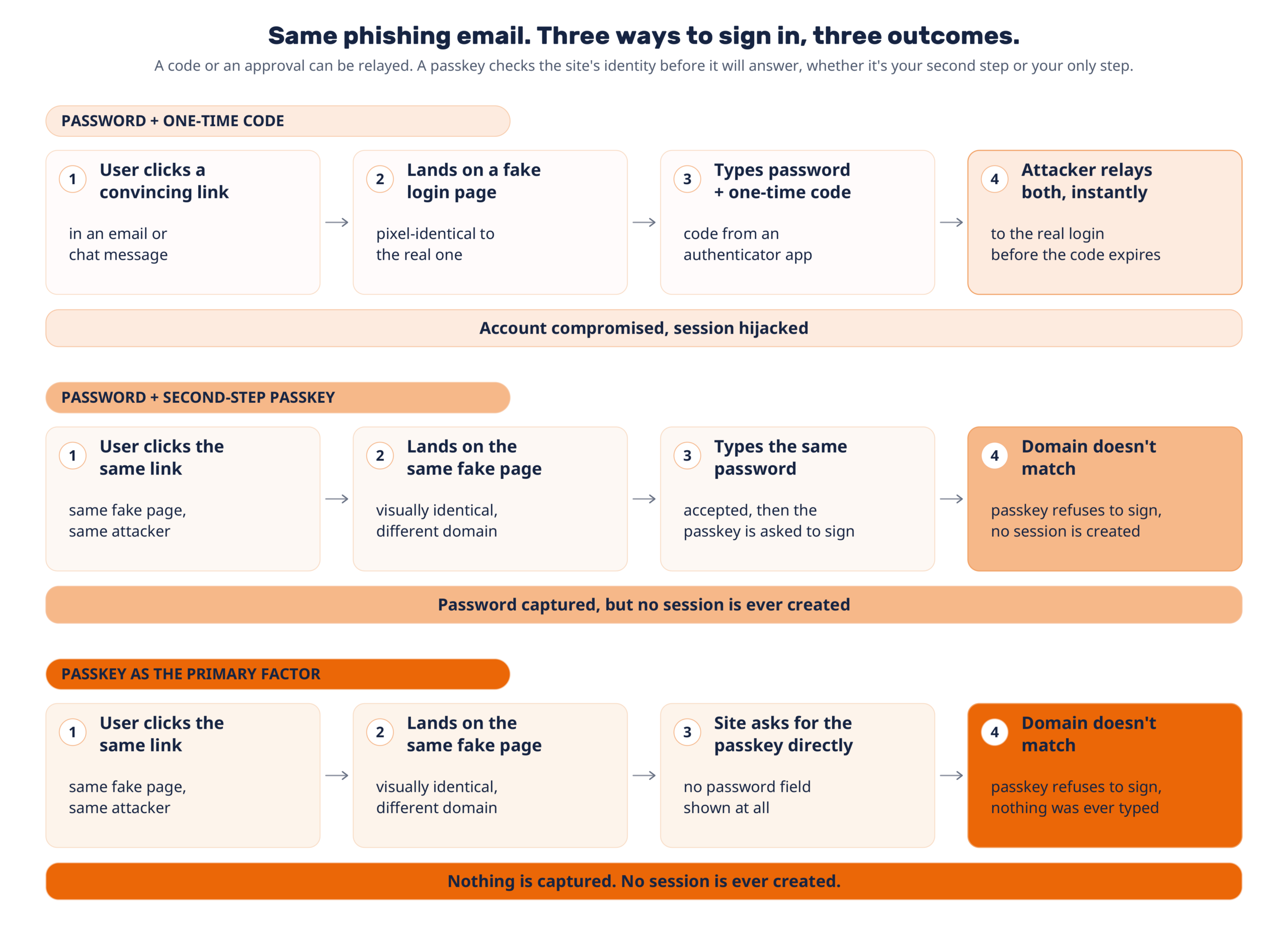
Figure 1. The same phishing attempt against three ways to sign in. A password and one-time code can both be relayed. A password with a second-step passkey still lets an attacker capture the password, but never a session. A passkey used as the primary factor leaves nothing for the fake page to capture at all.
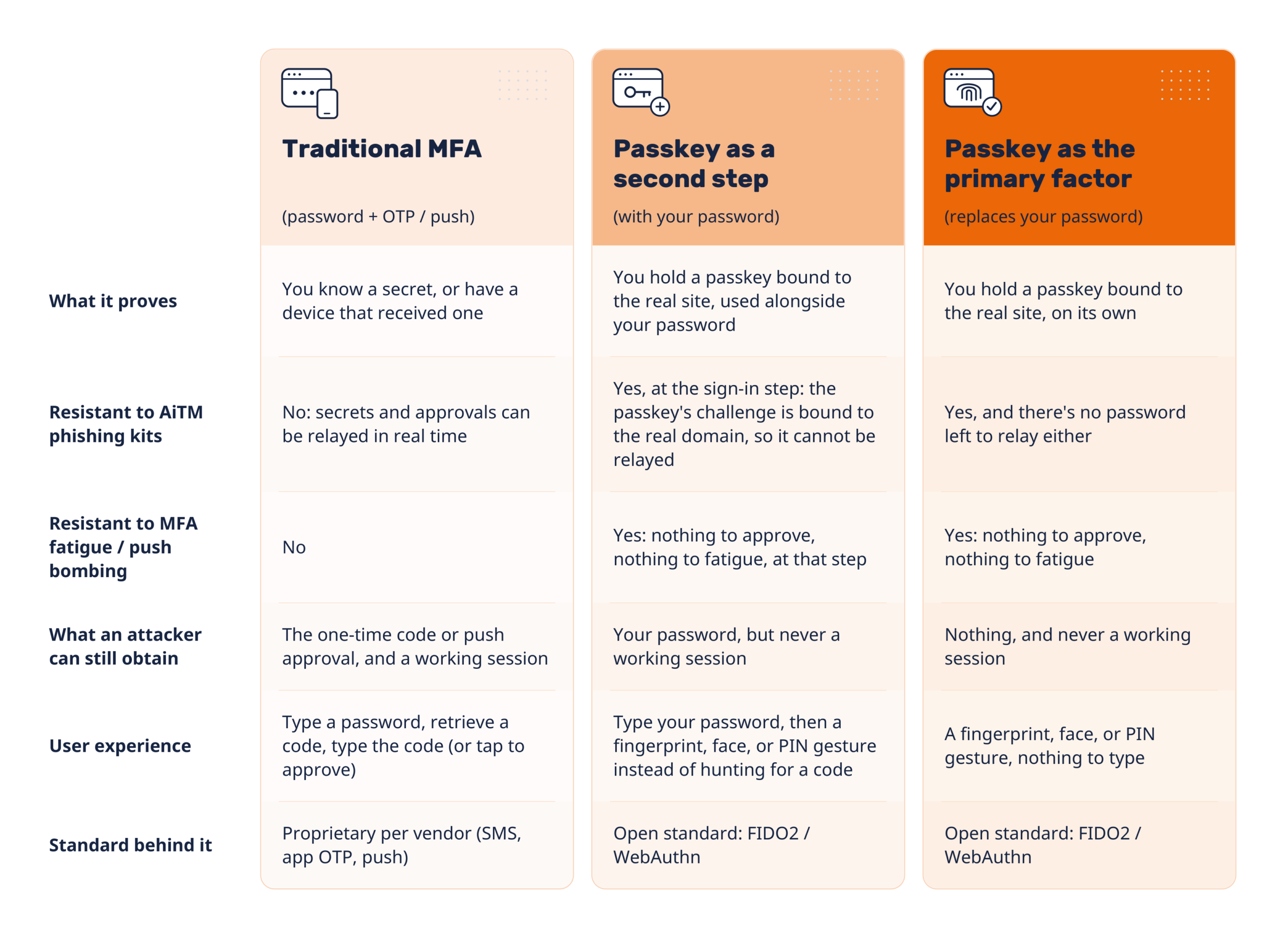
Traditional MFA vs. phishing-resistant MFA, side by side
What you decide, and how far you roll it out
WALLIX Sovereign Identity Access gives you a governance layer that decides how your organization signs in with a passkey, and which ones it will accept, before anyone signs in with one. That control is set per organization, and per group within it. It is not a single global switch.
- Primary factor or second step: you decide whether a passkey replaces the password entirely for a group, or works alongside it as a second step. Some groups can sign in with a passkey alone; others keep the password and add a passkey on top.
- Which models you accept: you decide which authenticator models your organization accepts. You set the list, not the user.
- Independent certification: you can require authenticators to be independently certified, checked against the FIDO Alliance’s signed metadata.
- Proof of model: you can require the authenticator to prove what model it is, cryptographically, not just declare it.
- Company-issued or bring-your-own: you can require company-issued security keys, or allow the device your people already carry. Your call, per organization.
Anything that doesn’t meet the bar you set is refused the moment a user tries to register it. It is never accepted and then rejected later at every sign-in.
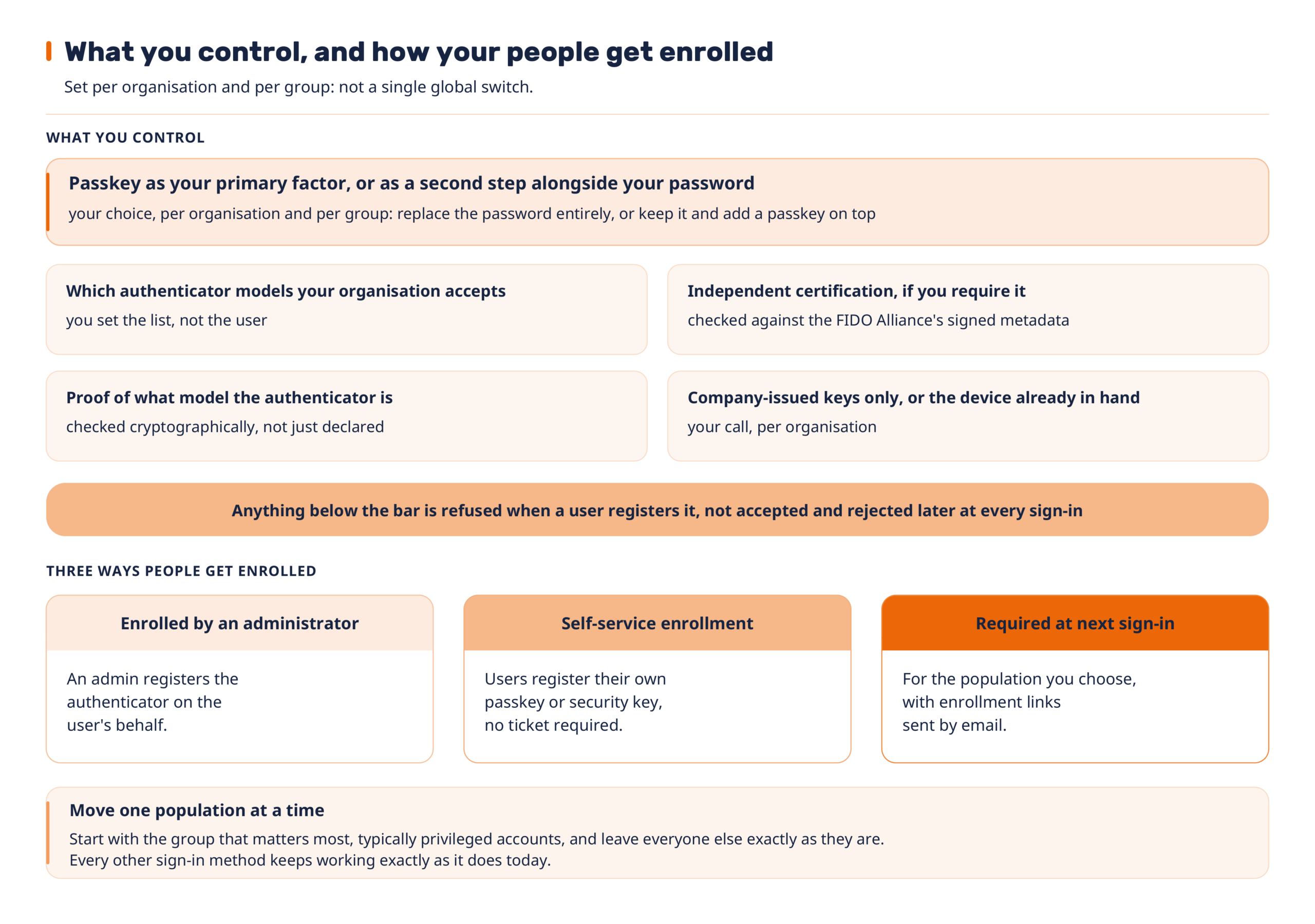
Figure 2. What an administrator controls, including whether a passkey replaces the password or works alongside it, and how people get enrolled: set per organization and per group, not a single global switch.
Nothing about setting up passkeys changes what your other sign-in factors do: one-time-code apps, SMS, and push approvals keep working exactly as they did before, for every population you haven’t moved yet. That’s what makes a phased rollout safe and reversible.
Today, this governance layer applies to sign-in for the applications behind your single sign-on. Sign-in also keeps working when it’s embedded in your own portal, which is usually where this kind of change breaks.
A practical way to begin:
- Decide your authenticator policy: which models you’ll accept, whether you require independent certification, and whether a passkey replaces the password or works alongside it for this group.
- Choose your first group, typically privileged administrators, and enrol them, either by registering their authenticator for them or letting them self-enrol.
- Expand group by group. Every other sign-in method keeps working exactly as it does today until you decide to change it.
What changes for your users and your service desk
For the people signing in, this looks like one of two things, depending on how you’ve set it up. Where a passkey is a second step, the change is from hunting for a code to a fingerprint, face, or PIN gesture, faster than typing a one-time code, still preceded by the password. Where a passkey has replaced the password as the primary factor, sign-in is just that gesture: nothing to type at all.
There’s no hardware project behind it unless you want one: people enrol on what they already carry, a fingerprint sensor or face unlock already built into their laptop or phone, and can hold more than one credential. Cross-device enrollment works by scanning a code with a phone, so nobody is blocked by not having the right device in front of them.
Enrollment doesn’t require a ticket either: people can self-enrol, or an administrator can register an authenticator on their behalf, or you can require it at their next sign-in for the population you choose.
Nothing already registered needs to be redone. Security keys registered years ago keep working exactly as they do today.
And because there’s nothing left to approve or type at that step once a population has moved to a passkey, the “I didn’t get my code” tickets and MFA-fatigue complaints for that population go away.
What you can prove
Passkey sign-in doesn’t just make phishing harder. It gives you evidence you can act on.
Applications behind your single sign-on (SSO) receive the assurance level of each session, not just a yes or no answer. They can see whether a session was completed with a passkey, a one-time code, or a push approval, and can require phishing resistance before granting access. Client certificates are deliberately not counted as phishing-resistant in this model.
If you need to report to a European standard, a passkey session can optionally be reported as eIDAS High (the highest assurance level under eIDAS, the EU’s electronic identification and trust services regulation).
On the registration side, an authenticator cannot be quietly attached to a second account anywhere on the platform: the attempt is refused, the refusal message names no account, and it’s recorded in your logs and your SIEM alongside your other authentication events.
For service providers
If you sell and operate WALLIX Sovereign Identity Access across customer tenants, this is administered the same way as the rest of the platform: policy and delegated administration are set per tenant, so you can standardise one phishing-resistant offer and administer it for each client separately.
What phishing-resistant MFA does not solve
Phishing-resistant MFA is one control, not a complete security program, and it’s worth being precise about its edges.
Binding the sign-in to the real site protects the sign-in itself. It does not protect a session that’s stolen after a legitimate sign-in, for example by malware already running on a compromised device. Session and device hygiene still matter.
Where you’ve deployed a passkey as a second step, the password is still there, and it can still be phished on its own. It’s simply no longer sufficient by itself to get an attacker a working session. Where you’ve deployed a passkey as the primary factor, there’s no password left to phish for that population, but there’s also no password fallback: you’re relying entirely on the strength of the authenticator policy you’ve set for that group.
Verification is also only as strong as what the authenticator can prove. Hardware authenticators are checked against the FIDO Alliance’s signed metadata; software passkey providers are identified on a self-declared identity rather than an independently verified one. If your organisation needs a cryptographic guarantee rather than a declared one, set the certification and proof-of-model requirements described above, which excludes software-only providers by design.
WALLIX Sovereign Identity Access is delivered from our own infrastructure, hosted in France. This is relevant if data residency and sovereignty are part of how your organisation evaluates identity infrastructure, not just a feature checklist.
Ready to remove phishing from your MFA?
Talk to your WALLIX account team to discuss phishing-resistant policies for your tenant, or request a demo of WALLIX Sovereign Identity Access.
WALLIX Sovereign Identity Access is WALLIX’s platform for single sign-on (SSO), multi-factor authentication (MFA), and user provisioning.
-
 PRIVILEGE ACCESS MANAGEMENT REPORTS WHITEPAPER
 -
PRIVILEGE ACCESS MANAGEMENT REPORTS WHITEPAPER
-
 COMPLIANCE PRIVILEGED ACCESS MANAGEMENT WEBINARS